
When your existing NetSuite environment is largely clean, with usable data, logical business processes, and manageable customizations, then migration is typically the preferable choice since it is quicker, less costly, and less disruptive. However, when you have a system that is full of bad data, failed processes, or patchwork fixes over the years, reimplementation is the smarter long-term action. The correct choice is determined by the well-being of your existing system. Being able to fix a broken foundation is not always the most time and cost saving solution than attempting to salvage the entire system.
Why This Feels Hard to Decide
At the time when you encounter this decision, each of these alternatives seems logical. Migration is safe as you are reusing what you already have. Reimplementation is risky as you begin afresh. The bewilderment is due to only one thing- you do not always know how bad your present system really is.
Surface-wise, things may appear well. The system is processing transactions, generating reports, and the teams are using the system on a daily basis. However, behind the scenes, finance is adjusting numbers in Excel, operations is bypassing workflows and IT is having to patch scripts all the time. It is there the true choice is made–not in definition but in the extent of absconded damage.
Start by Auditing Your Current NetSuite Setup
You must have a clear idea of what you are dealing with before making a choice. Not assumptions—facts.
Data: Can You Trust What’s Already There
This is always the first red flag. Do we have duplicated customers, vendors or even items? Do financial records match reports? Do your teams use external spreadsheets to repair data? When you see frequent manual corrections, missing or patchy records, or bad data format, then migration will simply transfer this mess.
The poor imports resulted in years of duplicate entries of an item by a wholesale distributor. Migration was adopted by them as a way of saving time. Their inventory reports were not reliable after 6 months since the root cause was not resolved.
Workflows: Are Teams Following the System or Avoiding It
See what the real-life users of NetSuite do. Do approvals flow through an automated and followed process or does the people go round the system to get things done in a more expedited manner? When the workflows in the system are not utilized, that is an indication that the system does not correspond to real business processes or it is too complicated to be effectively utilized.
The approval workflows were configured in a services company, but instead the managers were approving requests via email. The system was not in line with the way decisions were really made. Migration wouldn’t fix that.
Customizations: Are They Helping or Holding You Back
Customizations can be strong, yet they may turn out to be technical debt. Do you continue to use all your scripts and workflows? Are they documented? Will little things spoil everything? When only one developer is knowledgeable about a script, or when you are too afraid to touch some code, then you are not working with assets you are working with risks.
Reporting: Do You Trust Your Numbers Without Question
This is the most open test. When leadership request a report and the team responds by giving us some time to validate the numbers, that is not a reporting problem, that is a system trust problem. One manufacturing company was exporting NetSuite data to Excel each month simply to make reporting corrections. They believed that it would make things smooth by migration. It did not due to the inherent flaw in the reporting structure itself.
Compare the NetSuite Migration vs Reimplementation
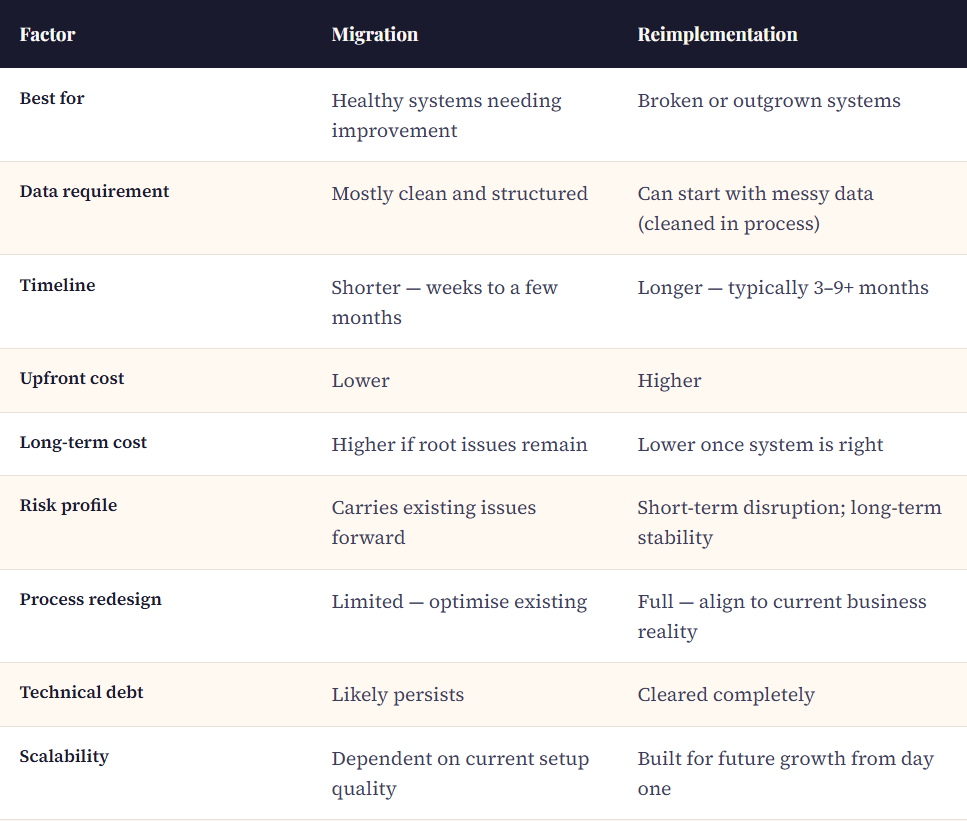
Compare the Two Paths Based on Your Reality
Once you’ve audited your system, the decision becomes clearer.
When Migration Actually Makes Sense
When your data is generally clean, your workflows are aligned with operations, your reporting is reliable, and your customizations are limited and still relevant, then choose migration. In this instance you are not making a broken system work again, you are making a working system even better.
What you get: reduced time frame, reduced cost and reduced disruption. But be practical–migration does not create new systems, but only makes your existing systems work more efficiently.
When Reimplementation Becomes the Smarter Move
Lean toward reimplementation when you have inconsistent or unreliable data, you do not have workflows that represent the actual operations, your system is over-customized and fragile, or your reporting is not trusted. This is not optimization, this is rebuilding a foundation. And mending bit by bit will in most cases be more expensive than a proper repair.
What you will get is clean structured data, processes that are well aligned to current business needs and a scalable system that will not break with growth. What you believe: you will have more time, you will have more upfront investment and you will also require proper change management.
Address the Objections Honestly
There is concern that reimplementation is too costly. Yes, upfront it is. However, contrast it with the current inefficiencies, manual corrections and poor decision making caused by bad data. Those costs are concealed and they build up quicker than anticipated.
Other people believe that they do not have time to reimplement. When your system is slowing your day-to-day activities, you are already wasting time. Migration may seem quicker but when it fails to remedy the underlying causes, you will find yourself in this decision once more.
The trap most frequently used is that you will clean things up after the migration. When data and processes are migrated, teams move on, priorities change and cleanup never really occurs. The identical issues persist- only in a different setting.
Final Thought
It is readily tempting to lean towards migration since it is safer. The temptation to not reimplement because it will be larger is enticing. But this choice is not about hard work–it is about result. When you are going about the wrong problem, the best performance will not be of assistance.
Concentrate on only one thing: are you treating symptoms or getting rid of the cause? Since in the long run, the more appropriate option is not the quicker or less expensive one. It is the one that will make sure that you do not need to re-decide on this decision within a year.
Leave a Reply